I’ve been using Claude Code daily for last few months. And if there’s one thing I’ve learned, it’s this: most developers burn through tokens unnecessarily.
It’s not that Claude Code is expensive—it’s that we use it inefficiently. We load massive contexts when we don’t need to. We use powerful models for simple tasks. We let old conversations pile up like digital clutter.
After tracking my usage obsessively (and watching my token count), I’ve developed a system that dramatically cuts consumption without sacrificing productivity.
Here are the 12 techniques that made the biggest difference.
Part 1: Model Selection
1. Use Haiku for Small Tasks
Not every question needs the most powerful model.
Reading a file? Quick syntax question? Simple refactor? Haiku handles these perfectly well—and it’s significantly faster and cheaper than Opus.
Think of it like using a sedan for grocery runs instead of a semi-truck. Both get the job done, but one makes a lot more sense.
When to use Haiku:
- Simple file reads
- Quick questions about syntax
- Basic code generation
- Straightforward explanations
When to use Opus:
- Complex architectural decisions
- Multi-file refactoring
- Debugging intricate issues
- Code review and analysis
2. Always Set a Custom Model
Never stick with the default model. It’s like letting your phone choose your apps for you.
Run this command to set your preferred model:
/model claude-opus-4-5-20251101You can see list of all the models provided by Claude Here.
I use Opus 4.5 for most of my work because I need that reasoning power. But I consciously switch to Haiku for lighter tasks.
The key word is consciously. Make model selection a deliberate choice, not an afterthought.
Part 2: Context Management
This is where most token waste happens. Context management is the single biggest lever you have for controlling costs.
3. One Chat Window Per Task
Here’s a pattern I see constantly: developers work on feature A, then switch to debugging bug B, then answer a question about system C—all in the same chat window.
Every message from those previous tasks is still in context. It’s dead weight. Claude is processing information about feature A when all you need is help with bug B.
The fix is simple: Use /clear when switching to an unrelated task.
Yes, it feels wasteful to “lose” that context. But that context was already costing you tokens with every subsequent message.
4. Summarize at 50% Context
Don’t wait until you hit the context limit. By then, you’ve already paid a premium for an overstuffed conversation.
Here’s my workflow:
- Check context usage:
/context - When it hits around 50%, run:
/compact
The /compact command creates a summary of your conversation and loads a fresh session with that summary pre-loaded. You keep the important context without the bloat.
Think of it like defragmenting your conversation. Same information, less overhead.
5. Set Up a .claudeignore File
Just like .gitignore tells Git what to skip, .claudeignore tells Claude what to ignore.
Add these to your .claudeignore:
node_modules/build/ordist/- Large data files
- Generated files
- Log files
- Dependencies you never modify
Less scanning means fewer tokens. And Claude doesn’t need to index your entire node_modules folder to help you fix a bug in your authentication logic.
6. Be Specific in Your Prompts
Compare these two prompts:
❌ “Something’s broken somewhere.”
✅ “Fix the authentication error in src/login.ts at line 47.”
The first prompt forces Claude to search, analyze, and guess. The second goes straight to the problem.
Specificity saves tokens AND time. It’s a rare win-win.
Tips for specific prompts:
- Include file paths
- Reference line numbers when relevant
- Describe the expected vs. actual behavior
- Mention the error message if there is one
7. Point to Specific Files
Same principle as above, applied to file references:
❌ “Find the user service.”
✅ “Read src/services/user.ts”
Direct paths eliminate search operations. Search operations consume tokens. The math is simple.
If you know where something is, say so. Don’t make Claude play detective.
8. Use Sub-Agents for Complex Tasks
When you’re working on something complex—say, refactoring an authentication system—you don’t need everything in one massive context.
Instead, let Claude spawn focused sub-agents. Each handles one specific piece:
- One agent analyzes the current structure
- Another generates the new implementation
- A third writes the tests
Each agent has a clean, focused context. The result is cleaner code and lower token usage.
Read more about agents and sub-agents over here.
Part 3: Monitoring Your Usage
You can’t optimize what you don’t measure. These tools help you stay aware of your consumption.
9. Check the Usage Dashboard
Bookmark this URL: https://claude.ai/settings/usage
It auto-refreshes every few minutes, so you can keep an eye on spending without constantly reloading. I keep it open in a tab during heavy work sessions.
10. Use the /usage Command
For quick checks without leaving your terminal:
/usageThis shows your current session usage and weekly totals.
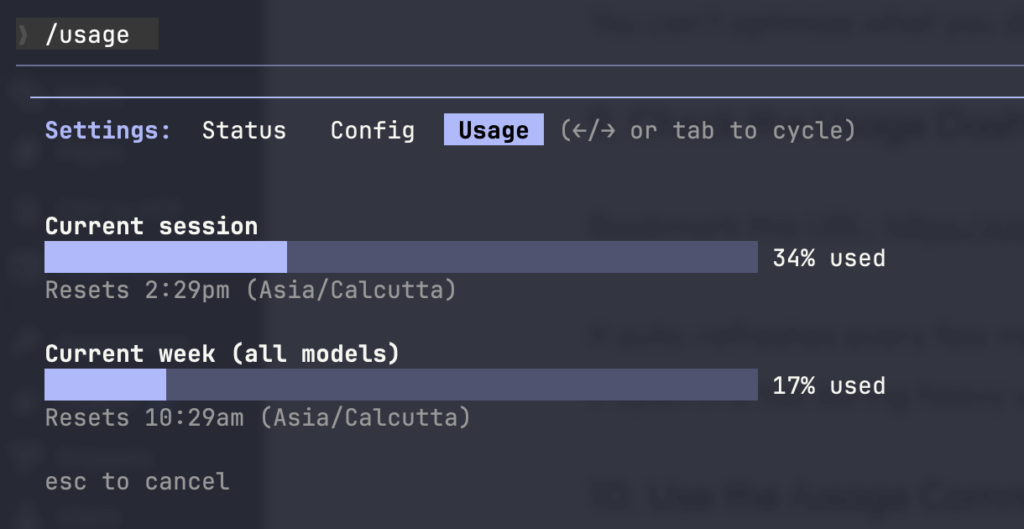
Important note: “Current Session” resets every 5 hours. Don’t panic when it suddenly drops—it’s by design.
11. Install claude-hud
For real-time context monitoring right in your terminal, install the claude-hud plugin.
It displays your context usage as you work, so you always know where you stand. I’ve found it more accurate than alternatives like ccusage.
Installation: github.com/jarrodwatts/claude-hud
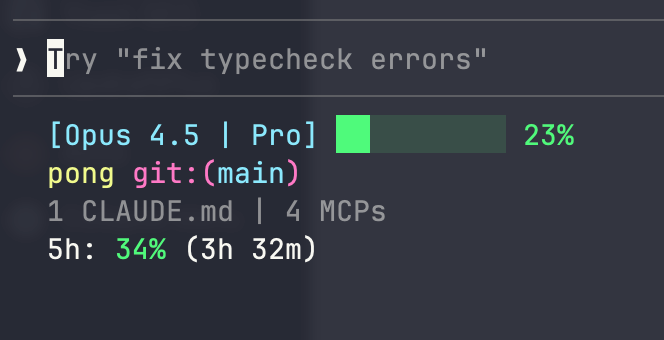
This is my favorite addition to my Claude Code setup. Having context usage visible at all times changes how you work—you become naturally more efficient because you can see the cost of your choices in real time.
12. Use Headless Mode for Automation
If you’re running Claude Code in scripts or CI/CD pipelines, use the --print flag:
claude --print "run tests"Headless mode uses significantly fewer tokens than interactive sessions. For automated tasks where you don’t need the back-and-forth, it’s the obvious choice.
The Key Insight
Here’s the mental model that ties everything together:
Treat your context window like computer RAM.
You wouldn’t load every file on your computer into memory just to edit one document. You load what you need, when you need it, and release it when you’re done.
Claude Code works the same way. Every piece of context you load costs tokens—not just once, but with every message in that conversation.
So be intentional:
- Load only what you need
- Release (clear) when you’re done
- Monitor constantly
- Choose the right model for the job
Quick Reference
Essential Commands
| Command | Purpose |
|---|---|
/clear | Start fresh session |
/compact | Summarize and reload with summary |
/context | Check current context usage |
/usage | Show session and weekly usage |
/model [name] | Set custom model |
Useful Resources
- Usage Dashboard: claude.ai/settings/usage
- Claude Models Documentation: platform.claude.com/docs/en/about-claude/models/overview
- claude-hud Plugin: github.com/jarrodwatts/claude-hud
Start Here
If you’re overwhelmed by 12 techniques, start with these three:
- Set up .claudeignore — One-time setup, permanent savings
- Use /clear between tasks — Instant habit, immediate impact
- Install claude-hud — Real-time visibility changes behavior
Once these become second nature, layer in the others.
The goal isn’t to obsess over every token. It’s to build efficient habits so you can focus on the work that matters.